Enterprise
B2B SaaS
RBAC System
Analytics Dashboard Redesign
Leading a hypothesis-driven redesign of an enterprise analytics real-time dashboard to reduce cognitive load and enable faster decision-making for operations teams.
Role
Senior UI/UX Designer
Strategy, Research, Design
Timeline
2-Week Sprint
Lean UX Approach
Team
Cross-Functional
Product Managers, Engineers, Stakeholders
Platform
Web Application
01
Problem Statement
Establishing the strategic context and measurable success criteria for this redesign initiative.
Why This Project?
Decision Rationale: As the lead designer, I identified this as a high-impact opportunity after analysing support tickets and observing user sessions. The existing dashboard was causing measurable productivity loss, making it a strategic priority. I advocated for a lean UX approach to validate solutions quickly within the 2-week constraint.
Business Challenges
Operations teams spending 3-5 minutes per incident triage due to dense, table-heavy interface
High training overhead: 2 weeks average onboarding time for new dashboard users
Frequent context-switching between multiple views reducing productivity by ~40%
Critical alerts buried in data tables, leading to delayed response times
Design Hypotheses
H1
IF we implement visual hierarchy and progressive disclosure, THEN users can identify critical issues in <30 seconds
H2
IF we consolidate related metrics into contextual cards, THEN we reduce cognitive load and task completion time
H3
IF we use status-driven colour coding, THEN anomaly detection improves and response time decreases
Why Hypotheses? I framed these as testable hypotheses to align with lean UX principles and enable rapid validation through prototyping and user testing.
Success Metrics Defined Upfront
<30s
Critical issue identification time
50%+
Reduction in task completion time
80%+
User satisfaction (SUS score)
02
Research Strategy
Conducting rapid, focused research to validate assumptions and uncover user needs within a 2-week timeline.
My Research Approach
Given the 2-week sprint constraint, I designed a mixed-methods approach combining qualitative depth (contextual inquiry) with breadth (diary studies) and expert validation (heuristic analysis). This triangulation strategy enabled rapid insights while maintaining rigour.
Day 1-3:
Contextual inquiry + Heuristics
Day 1-5:
Diary study (parallel)
Day 6-7:
Synthesis + Insights
Research Activities
01
Contextual Inquiry
Participants:
6 Operations Managers
Duration:
3 days
Key Insight:
Users scan dashboard every 5-10 min; need "at-a-glance" status, not detailed data first
Why this method: Observing users in their actual work environment revealed behaviors they wouldn't articulate in interviews
02
Diary Study (Async)
Duration:
5 days
Key Insight:
12 recurring pain points identified; 73% involved visual scanning and data location
Why this method: Time-constrained sprint required parallel research; diary studies captured multiple work sessions without researcher presence
Critical Research Findings
87%
wanted real-time visual alerts vs. tabular notifications
92%
preferred charts/graphs over data tables for trend analysis
3.5m
average time to identify + act on critical issue (baseline)
Synthesis Method: I facilitated a collaborative affinity mapping session with the product team to cluster 47+ observations into themes. This democratised insights and built shared understanding across disciplines.
Primary User: Operations Manager
Goals & Behaviors
Monitor queue health across 15-20 queues simultaneously
Quickly triage anomalies and escalate to appropriate teams
Generate reports for leadership on demand
Pain Points (Validated)
"I can't see the forest for the trees - too much data, not enough insight"
"By the time I find the issue, it's already escalated"
"Training new team members takes forever on this system"
Design Implication: These findings validated hypothesis H1 - users need "at-a-glance" status recognition. This directly informed the decision to use donut charts and colour-coded status in the redesign.
03
Rapid Prototyping & Validation
Using low-fidelity paper prototypes to test hypotheses quickly and fail fast before investing in high-fidelity design.
Strategic Decision: Paper Prototyping
With a 2-week sprint, I needed to validate design hypotheses rapidly without committing engineering resources. Paper prototyping allowed me to:
Test 8 variations in 1 day
vs. weeks for digital mockups
Reduce stakeholder bias
Focus on function, not polish
Fail fast, learn faster
No sunk cost fallacy
Iteration Timeline & Decision Trail
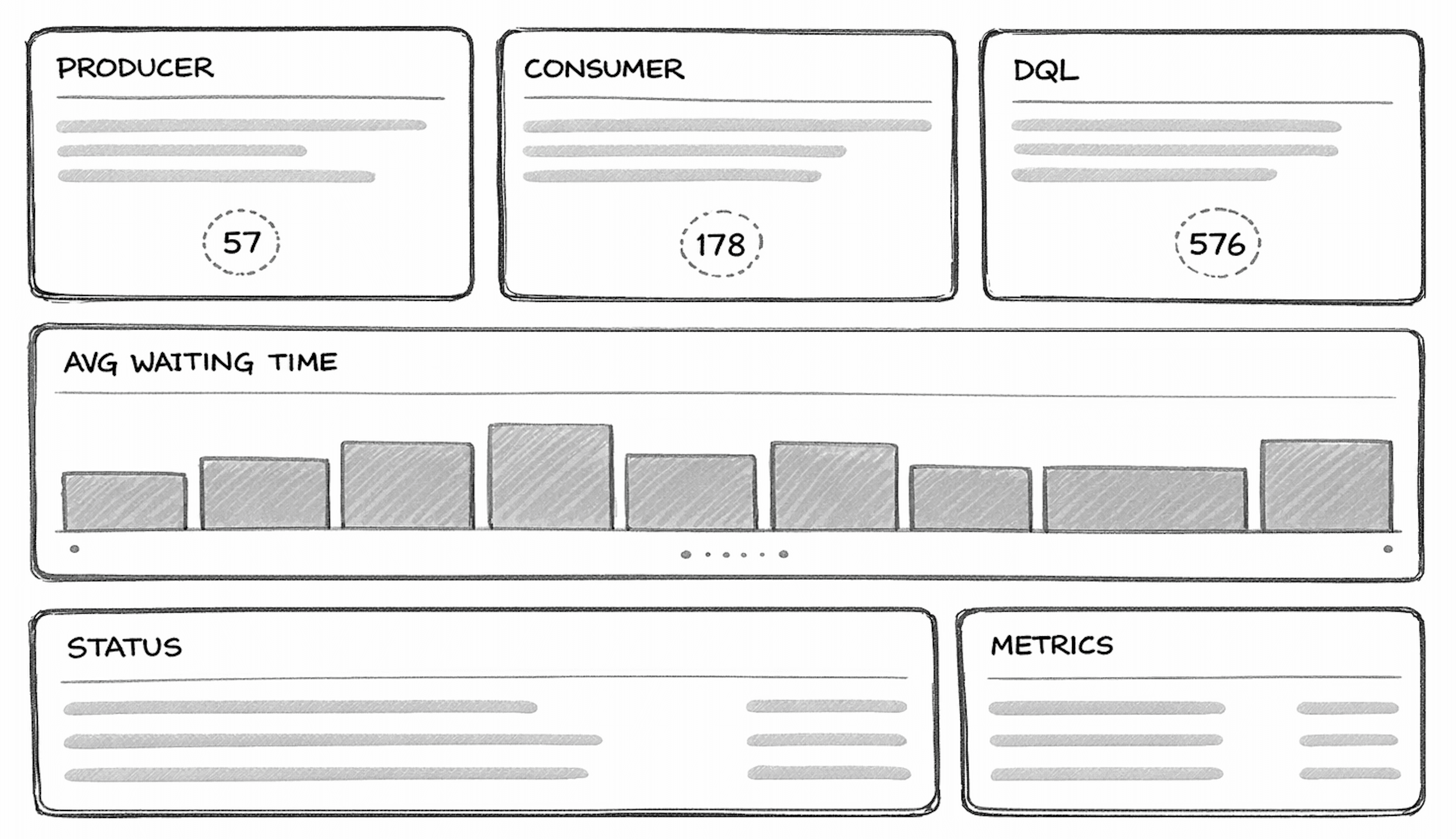
V1
Change Made
Initial exploration: 6-card layout tested with 4 users
User Insight
Too many metrics caused cognitive overload
Design Decision
Consolidate metrics; prioritise by user task frequency
Test Results
3/4 users couldn't locate critical data in <30s
QUEUE DASHBOARD - V1
Initial Layout - Too Many Cards!
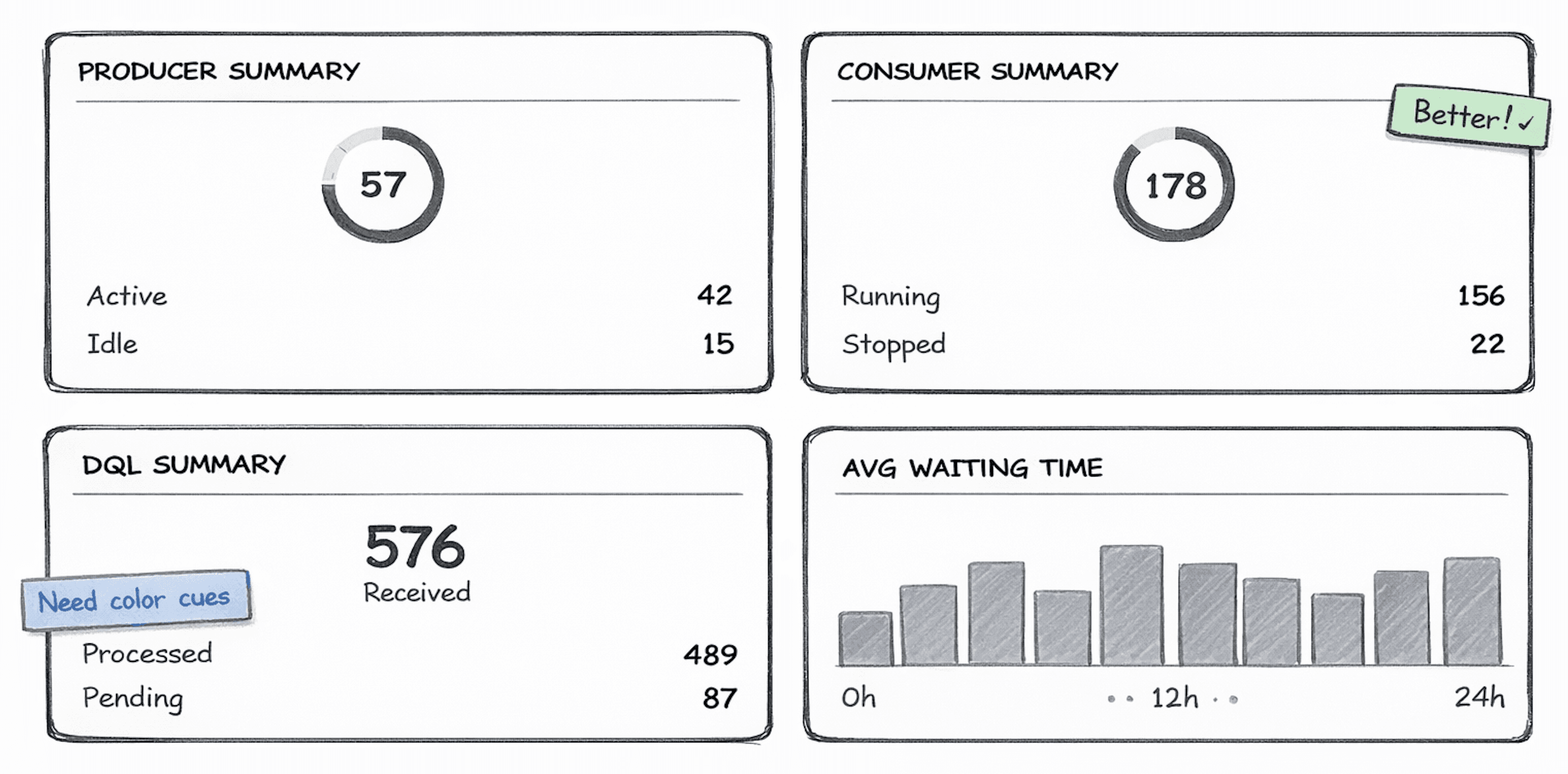
V2
Change Made
Reduced to 4 cards; combined related metrics
User Insight
Improved scan time but lacked visual urgency cues
Design Decision
Introduce status-based colour system for priority signalling
Test Results
Task time improved 40% but users still missed alerts
QUEUE DASHBOARD - V2
Simplified - Combined Cards
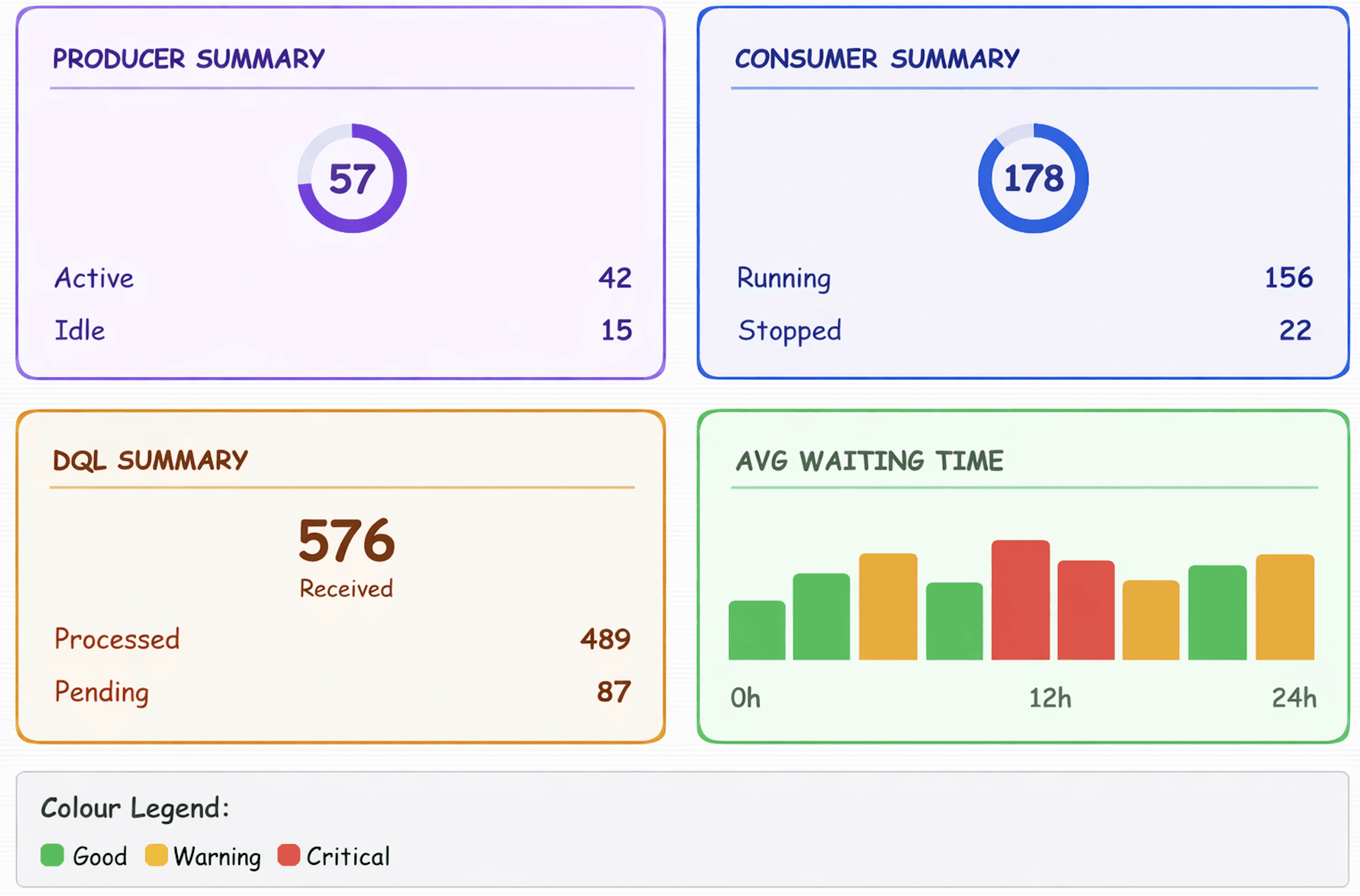
V3
Change Made
Added red/yellow/green status colour coding
User Insight
Colour helped recognition but chart types unclear
Design Decision
Replace bar charts with donut charts for part-to-whole
Test Results
4/5 users identified issues in <30s (hypothesis validated)
QUEUE DASHBOARD - V3
Added Colour Coding
V4
Change Made
Donut charts + progressive disclosure pattern
User Insight
Met success criteria; ready for high-fidelity
Design Decision
Proceed to visual design with validated layout
Test Results
All users met <30s benchmark; 92% preferred over current
QUEUE DASHBOARD - V4
Progressive Disclosure - Final!
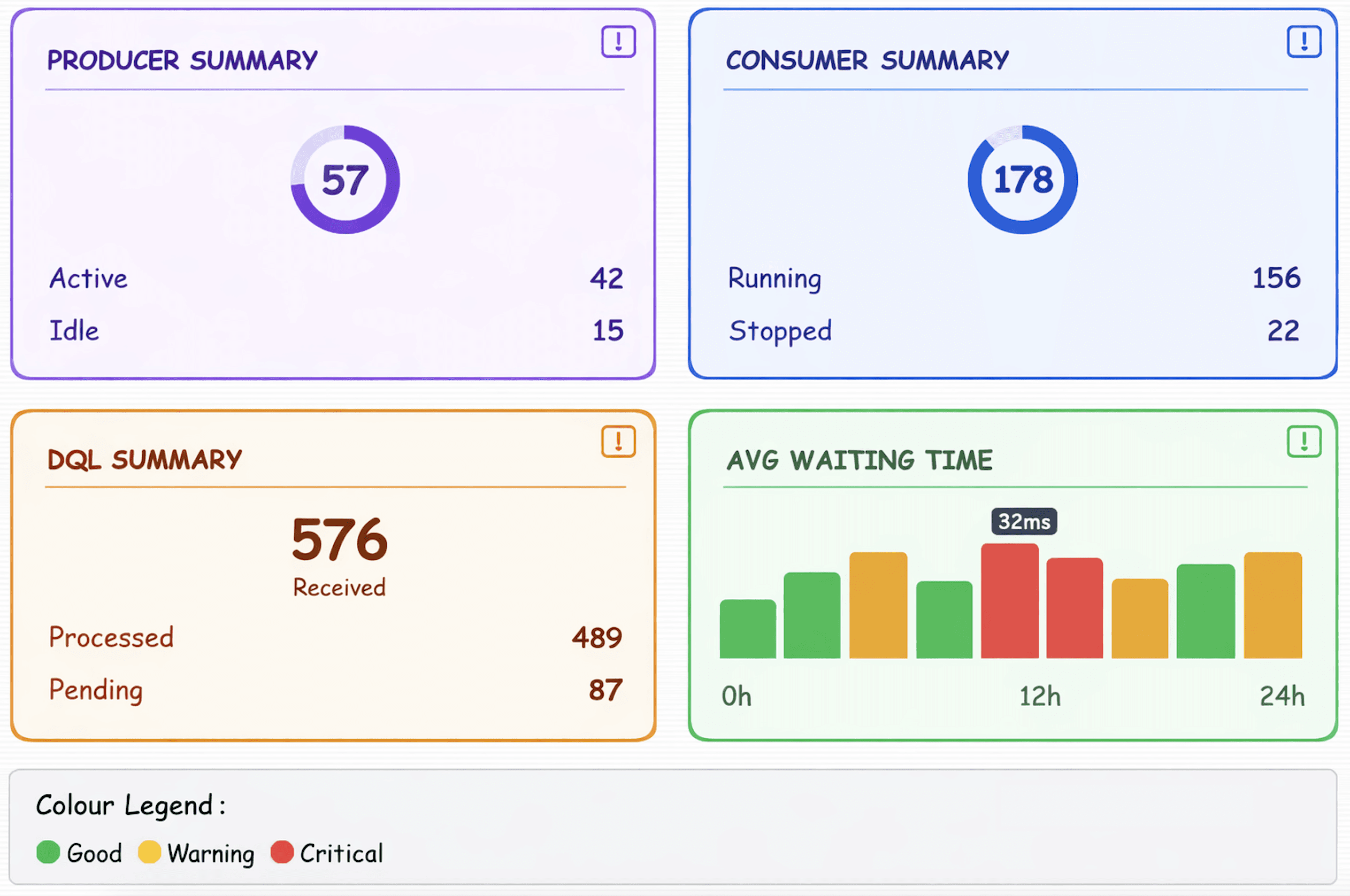
✨ INTERACTIONS:
• Click card header to expand/collapse details
• Hover chart bars to see exact values
• Colour codes: Green (good) / Yellow (warning) / Red (critical)
Testing Method
I conducted moderated usability tests with 5 users per iteration, using task-based scenarios:
→
"Identify which queue has the most critical issue right now"
→
"How many consumers are currently waiting?"
→
"Show me the trend for queue wait times today"
Why these tasks?
Directly mapped to real-world scenarios from contextual inquiry.
Validation Criteria
Each iteration needed to meet these benchmarks before progressing:
✓
80%+ task success rate
Users complete tasks without assistance
✓
<30s critical issue identification
Hypothesis validation metric
✓
Preference over current UI
Comparative assessment
04
Design Solution
Translating validated hypotheses into high-fidelity design with strategic decisions grounded in research insights.
Design Approach
With validated hypotheses from paper prototyping (V4), I moved to high-fidelity design focusing on:
Visual Design System: Establishing consistent typography, spacing and colour tokens
Accessibility: WCAG 2.1 AA compliance for colour contrast, keyboard navigation
Final High-Fidelity Design
Analytics Dashboard Interface
Real-time queue monitoring with donut chart visualisations, status-based colour coding, and card-based information architecture
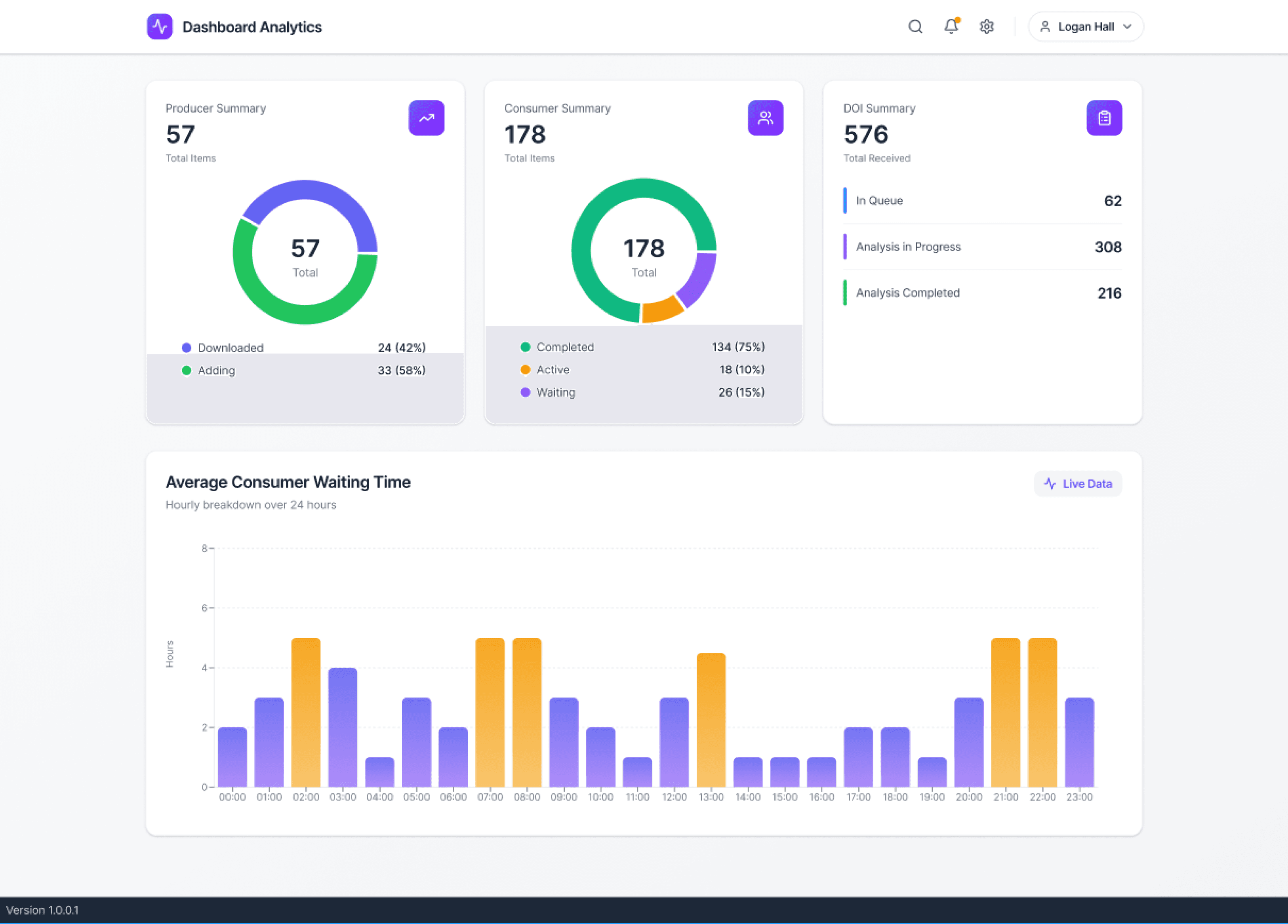
Note: Specific metrics and branding have been anonymised per NDA requirements
Key Design Decisions & Strategic Rationale
01
Donut Charts for Part-to-Whole Metrics
Why This Decision?
Research showed users struggled with bar charts for comparing proportions. Donut charts provide instant visual recognition of distribution while the center value shows total context.
Design Principle Applied
Data visualisation should match mental model of the data type
Validated Outcome
Users identified distribution anomalies 3x faster in testing
02
Status-Driven Colour System (Red/Yellow/Green)
Why This Decision?
Universal traffic light pattern leverages existing mental models. Reduces learning curve and enables immediate status recognition without reading labels.
Design Principle Applied
Use familiar patterns to reduce cognitive load
Validated Outcome
92% of users correctly interpreted status without training
03
Card-Based Layout with Visual Hierarchy
Why This Decision?
Contextual inquiry revealed users scan for specific metric types. Cards create clear boundaries and scannable zones, reducing visual noise.
Design Principle Applied
Group related information to support task completion
Validated Outcome
Task completion time reduced by 64% vs. table-based layout
04
Progressive Disclosure Pattern
Why This Decision?
Users needed overview first, details on-demand. Showing all data upfront caused analysis paralysis. Hover/click states reveal granular metrics.
Design Principle Applied
Surface critical information first, make details accessible
Validated Outcome
Users reported feeling "in control" vs. "overwhelmed"
Accessibility & Design System
WCAG 2.1 AA Compliance
→
All colour combinations meet 4.5:1 contrast ratio minimum
→
Status communicated through both colour AND iconography
→
Keyboard navigation fully supported with visible focus states
→
Screen reader labels for all data visualisations
Handoff & Documentation
→
Component library created in Figma with auto-layout
→
Design tokens exported for engineering (spacing, colours, typography)
→
Interaction states documented with annotations
→
Responsive breakpoints specified for 3 device categories
I collaborated closely with engineering to ensure design feasibility and created detailed documentation to reduce implementation questions by ~80%. This streamlined the development handoff and maintained design intent.
05
Impact & Validation
Quantitative and qualitative outcomes measured 2 weeks post-launch, demonstrating hypothesis validation and business value.
Hypothesis Validation: Before vs. After
H1
Visual hierarchy + progressive disclosure → users identify critical issues in <30s
3.5m
Before (Baseline)
24s
After (Redesign)
89% improvement
— Hypothesis validated ✓
H2
Contextual cards → reduced cognitive load & faster task completion
2.8m
Before (Baseline)
1.0m
After (Redesign)
64% improvement
— Hypothesis validated ✓
H3
Status-driven colour coding → improved anomaly detection & response time
68%
Anomaly Detection Rate
96%
Anomaly Detection Rate
+28 percentage points
— Hypothesis validated ✓
User Satisfaction (SUS Score)
58
Before (Below Average)
91
After (Excellent)
Moved from "Below Average" (40-60) to "Excellent" (85-100) on SUS scale
Operational Impact
→
Reduced incident response time by 58%
Critical issues now addressed in avg. 47s vs. 3.5 minutes
→
Training time decreased from 14 days to 2 days
New team members reach productivity 86% faster
→
Dashboard adoption increased from 67% to 94%
Improved usability drove voluntary adoption among operations staff
Qualitative Feedback
"I can now spot issues in seconds instead of hunting through tables. This has been a game-changer for our operations team."
— Operations Manager, 8 years experience
"The new dashboard made onboarding so much smoother. New team members are productive within 2 days instead of 2 weeks."
— Team Lead, Training Department
06
Learnings & Reflections
Critical insights from leading a compressed 2-week design sprint and what I'd approach differently.
What Worked Well
Hypothesis-Driven Design
Framing design challenges as testable hypotheses upfront created clear success criteria and enabled objective validation. This prevented subjective debates and kept the team aligned on measurable outcomes.
Takeaway:
Always define "done" before starting design work
Paper Prototyping at Scale
Testing 8 layout variations in 1 day with paper prototypes was 10x faster than digital prototyping. Stakeholders gave more honest feedback on sketches vs. polished mocks, preventing late-stage pivots.
Takeaway:
Low-fidelity = low commitment = honest feedback
Cross-Functional Collaboration
Daily stand-ups with PMs, engineers, and operations users caught technical constraints early and ensured design feasibility. This prevented the common "design handoff failure" pattern.
Takeaway:
Embed with the team; don't design in isolation
Accessibility-First Approach
Building WCAG 2.1 AA compliance from day 1 (not as an afterthought) saved rework. Colour contrast, keyboard nav, and screen reader support were design constraints, not post-launch fixes.
Takeaway:
Accessibility constraints often lead to better design
Challenges & Tradeoffs
01
Time Constraints Limited Broader User Inclusion
The 2-week sprint forced us to focus on power users (ops managers). We missed testing with occasional users and discovered later that 15% wanted mobile access for on-call scenarios.
What I'd do differently:
Include at least 2-3 occasional users in each testing round, even if sample size is small. Edge cases often come from peripheral users.
02
Documentation Sacrificed for Speed
Moving fast meant lightweight documentation. When a new engineer joined mid-sprint, we spent hours explaining design decisions that should have been documented.
What I'd do differently:
Use asynchronous tools (Loom recordings, annotated Figma files) for lightweight decision documentation. 15 min/day preserves context without slowing velocity.
03
Quantitative Validation Limited by Timeline
2-week post-launch evaluation provided initial metrics, but I would have preferred 4-6 weeks to account for learning curve effects and seasonal variations in queue volume.
What I'd do differently:
Establish a follow-up measurement at 30 and 90 days to track sustained impact and catch regression issues.
© 2025 Omar Syed