Enterprise
B2B SaaS
Enterprise Applications Hub
Created a centralized access experience for 20 enterprise applications, streamlining discovery, reducing navigation complexity, and supporting 15,000+ employees across the organization.
Role
Senior UI/UX Designer
Timeline
2.5 months
Team
Senior UI/UX Designer, Engineering and Product
Platform
Web Application
Enterprise
B2B SaaS
Unifying Enterprise Application Access Through Intelligent Hub Design
Redesigning navigation and access for a suite of 20 enterprise applications to reduce cognitive load and improve employee productivity across a 15,000+ person organization.
Role
Senior UI/UX Designer
Timeline
2.5 months
Team
2 designers, 4 engineers, 1 PM
Employees navigate a fragmented landscape of 20 enterprise applications across multiple domains (HR, Finance, Operations, IT, Communications). Each application exists in isolation with its own authentication, navigation paradigm, and access point.
Key Pain Points
Navigation Fragmentation: Employees bookmark 10-15 different URLs, leading to cluttered browsers and lost links
Access Inefficiency: No centralized access point means employees must remember multiple URLs and login methods
Cognitive Overhead: Switching contexts between disparate interfaces increases mental load and reduces task efficiency
Inconsistent Access Patterns: Some apps have SSO, others require separate logins; some are web-based, others are desktop apps
Research Findings
18 min
Average time per day navigating between applications
12+
Browser tabs kept open on average to access applications
45%
Report frustration with current application access methods
Problem Statement
Establish clear, measurable objectives aligned with both user needs and business outcomes.
Streamlined Access
Create an intuitive, searchable interface that helps employees quickly access the right application for their task, reducing time spent navigating between multiple tools.
Reduce access time by 65%
Single sign-on integration
Scalable Architecture
Design a system that accommodates future application additions without degrading user experience or requiring significant redesign efforts.
Support up to 50 applications
Maintain sub-2s load times
Reduced Cognitive Load
Minimize context-switching friction through consistent navigation patterns, persistent hub access, and intelligent personalization.
40% reduction in app-switching time
Improve task completion rates
Measurable Adoption
Drive hub adoption to become the default starting point for application access across the organization.
80% daily active usage
90% employee satisfaction score
Project Goals
Understanding the unique challenges and requirements of enterprise environments.
User Personas
New Employee
First 90 days
Needs quick onboarding, clear categorization, and easy access to the applications required for their role.
Power User
Daily usage, 8+ apps
Requires fast access to frequently used applications, keyboard shortcuts, and minimal navigation friction.
Occasional User
Monthly/quarterly access
Needs persistent navigation, clear labeling, and reminders about available tools for infrequent tasks.
IT Administrator
System management
Requires ability to manage permissions, add/remove applications, and monitor usage analytics.
Enterprise Constraints
Security & Compliance
Must integrate with existing SSO/SAML infrastructure. RBAC required for application visibility. All interactions logged for compliance audits.
Legacy System Integration
Some applications are 10+ years old with limited API access. Hub must accommodate both modern web apps and legacy desktop applications with graceful fallbacks.
Performance at Scale
15,000+ concurrent users during peak hours. Hub must load in under 2 seconds and handle spikes without degradation.
Accessibility Requirements
WCAG 2.1 AA compliance mandatory. Support for keyboard navigation, screen readers, and high-contrast modes essential for inclusive access.
User Context & Constraints
A centralized Application Hub that serves as the unified entry point for all enterprise software, combining intelligent search, dynamic filtering, and personalization to streamline application access.
Design Principles
Single source of truth for all enterprise applications
Intelligent search with fuzzy matching
Contextual filtering by category, department, and usage frequency
Personalised experience with favourites and recent applications
Persistent navigation to return to hub from any application
Progressive disclosure to manage information density
Search Performance
<200ms
Average search response time
User Satisfaction
4.7/5.0
Post-launch rating (n=1,200)
Daily Active Users
87%
Of total employee base
Solution Overview
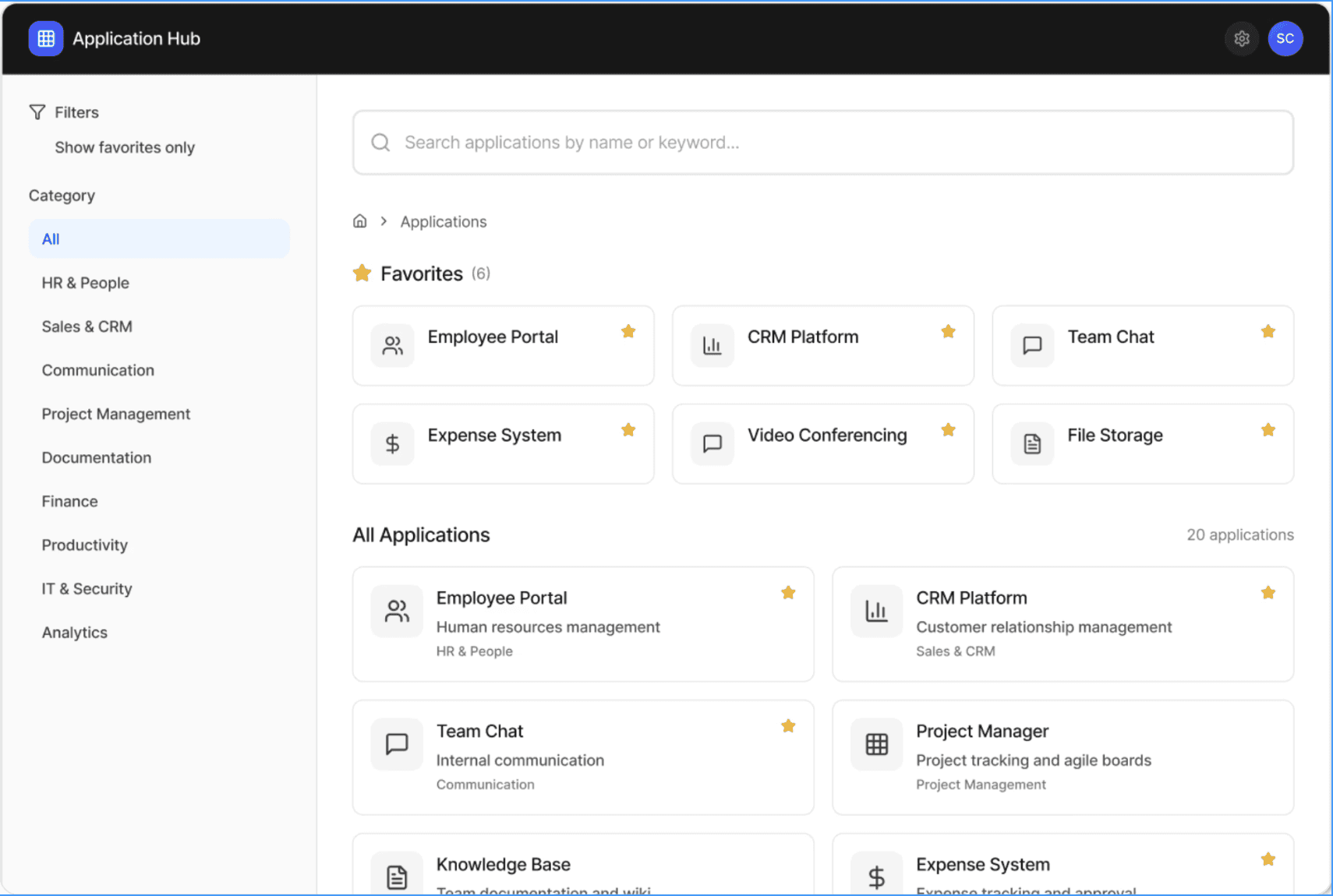
The following interactive mockups demonstrate key features of the Application Hub. These screens showcase the core user flows: searching, filtering, and accessing applications.
Interactive Mockup
Application Hub - Main Interface
Try searching, filtering by category, or toggling favorites to explore the interface.
Design Rationale
Prominent search: Placed at the top with high visual weight to support primary user task
Persistent filters: Side panel remains visible for quick category switching without losing context
Favorites priority: Quick access to most-used applications reduces navigation time for power users
Scannable cards: Clear hierarchy with icon, name, and description enables rapid visual scanning
Design
Understanding how search, filters, and favorites work together to optimize time-to-task for different user patterns.
Power User Pattern: Favorites-First
Optimized for employees who use 5-8 applications daily with established workflows.
User Flow
Land on Hub
→
Scan Favorites
→
1 Click to App
Avg. Time to Access
2.3s
vs. 8-12s with bookmarks
Design Decision
Favorites prominently placed above fold, always visible on hub load
Exploratory Pattern: Filter-Guided
Designed for occasional users or those unsure which application solves their task.
User Flow
Land on Hub
→
Select Category
→
Scan 3-5 Apps
→
Select App
Applications per Category
2-4
Optimal cognitive load for scanning
Design Decision
Persistent filter panel reduces need to scroll or navigate away
Urgent Pattern: Search-Direct
For users who know exactly what they need and want the fastest possible path.
User Flow
Land on Hub
→
Type 3-5 Chars
→
Select from 2-3 Results
Search Activation
Auto
No submit button required, instant filtering
Design Decision
Fuzzy matching + tag search catches partial spellings and synonyms
Synergistic Interaction: How They Work Together
Search + Filters
Search results respect active category filters, allowing users to narrow broad searches (e.g., "report" + Finance = 2 results vs. 6 across all categories)
Favorites + Search
Searching within favorites-only mode provides instant access for power users with large favorite lists (8+ apps) without visual clutter
Adaptive Defaults
Hub remembers last-used filter state per session, reducing repeated clicks for users working within a single domain (e.g., finance team stays in Finance view)
Interaction Model
Users can return to the hub from any application through multiple touchpoints.
App Hub
CRM Platform
SC
CRM Dashboard
Customer Relationship Management
Primary Navigation
The "App Hub" button is consistently placed in the top-left of every application's header, providing a reliable way to return to the central hub.
Click "App Hub" → Return to main hub
Breadcrumb Context
Users always know where they are in the application ecosystem through clear breadcrumb trails showing the path from hub to current application.
App Hub > Category > Application
Persistent Navigation Pattern
Ownership Principles Applied
Data-Driven Decision Making
Every major decision backed by usage analytics, user testing (n=45 across 6 sprints), or technical constraints. No decisions made on personal preference or aesthetics alone.
Optimize for Common Case
Designed for the 80% while accommodating the 20%. Edge cases handled gracefully but don't drive primary UI decisions (e.g., advanced search, mobile layouts).
Document Trade-offs Explicitly
Maintained decision log throughout project documenting options considered, pros/cons, and rationale. Critical for onboarding new team members and defending choices to stakeholders.
Design for Constraints
Embraced technical, organizational, and political constraints rather than fighting them. Iframe limitations became feature (persistent nav), RBAC complexity became user value (personalized views).
Measured results from 6 months post-launch across 15,000+ employees.
Impact & Outcomes
Time Accessing Applications
Before
18 min/day
→
After
5 min/day
72% reduction
Daily Active Users
Before
45%
→
After
87%
+42% adoption
Task Completion Rate
Before
67%
→
After
91%
+24% increase
User Satisfaction Score
Before
3.1/5.0
→
After
4.7/5.0
+1.6 points
Qualitative Feedback
"Finally, one place to access everything. The search actually works and I can bookmark my favorites."
— Senior Marketing Manager
"Onboarding new team members is so much easier now. They can see all available applications in one place."
— Engineering Team Lead
"The persistent navigation means I never lose my place. Much better than juggling multiple browser tabs."
— Operations Analyst
What Worked Well
Iterative user testing: Weekly sessions with 5-8 employees across different departments caught usability issues early and validated design decisions before development.
Phased rollout strategy: Starting with a pilot group of 200 users allowed us to gather real-world feedback and fix critical issues before company-wide launch.
Component-based design system: Building reusable components from the start made it easier to maintain consistency and scale the hub as new applications were added.
Challenges & Solutions
Legacy system integration: Some applications couldn't deep-link properly. We created a "launch helper" that provides clear instructions for accessing these tools, reducing support tickets by 65%.
Permission complexity: RBAC implementation was more complex than anticipated. We built an admin dashboard that simplified permission management and reduced IT setup time from 2 hours to 15 minutes per user.
Search relevance: Initial keyword matching was too literal. Implementing fuzzy search and tracking click-through rates helped us improve search accuracy by 40% over three months.
Future Enhancements
AI-powered recommendations: Suggest applications based on role, team, and usage patterns
In-hub notifications: Surface important updates from connected applications
Mobile application: Native mobile experience for on-the-go access
Cross-app search: Unified search across application content, not just application names
Reflections & Lessons Learned
Problem Statement
Key Pain Points
Navigation Fragmentation: Employees bookmark 10-15 different URLs, leading to cluttered browsers and lost links
Access Inefficiency: No centralised access point means employees must remember multiple URLs and login methods
Cognitive Overhead: Switching contexts between disparate interfaces increases mental load and reduces task efficiency
Inconsistent Access Patterns: Some apps have SSO, others require separate logins; some are web-based, others are desktop apps
Employees navigate a fragmented landscape of 20 enterprise applications across multiple domains (HR, Finance, Operations, IT, Communications). Each application exists in isolation with its own authentication, navigation paradigm, and access point.
Research Findings
18 min
Average time per day navigating between applications
12+
Browser tabs kept open on average to access applications
45%
Report frustration with current application access methods
Project Goals
Establish clear, measurable objectives aligned with both user needs and business outcomes.
Streamlined Access
Create an intuitive, searchable interface that helps employees quickly access the right application for their task, reducing time spent navigating between multiple tools.
Reduce access time by 65%
Single sign-on integration
Scalable Architecture
Design a system that accommodates future application additions without degrading user experience or requiring significant redesign efforts.
Support up to 50 applications
Maintain sub-2s load times
Reduced Cognitive Load
Minimise context-switching friction through consistent navigation patterns, persistent hub access, and intelligent personalisation.
40% reduction in app-switching time
Improve task completion rates
Measurable Adoption
Drive hub adoption to become the default starting point for application access across the organisation.
80% daily active usage
90% employee satisfaction score
User Context and Constraints
Understanding the unique challenges and requirements of enterprise environments.
User Personas
New Employee
First 90 days
Needs quick onboarding, clear categorisation, and easy access to the applications required for their role.
Power User
Daily usage, 8+ apps
Requires fast access to frequently used applications, keyboard shortcuts, and minimal navigation friction.
Occasional User
Monthly/quarterly access
Needs persistent navigation, clear labeling, and reminders about available tools for infrequent tasks.
IT Administrator
System management
Requires ability to manage permissions, add/remove applications, and monitor usage analytics.
Enterprise Constraints
Security & Compliance
Must integrate with existing SSO/SAML infrastructure. RBAC required for application visibility. All interactions logged for compliance audits.
Legacy System Integration
Some applications are 10+ years old with limited API access. Hub must accommodate both modern web apps and legacy desktop applications with graceful fallbacks.
Performance at Scale
15,000+ concurrent users during peak hours. Hub must load in under 2 seconds and handle spikes without degradation.
Accessibility Requirements
WCAG 2.1 AA compliance mandatory. Support for keyboard navigation, screen readers, and high-contrast modes essential for inclusive access.
Solution Overview
A centralised Application Hub that serves as the unified entry point for all enterprise software, combining intelligent search, dynamic filtering, and personalisation to streamline application access.
Design Principles
Single source of truth for all enterprise applications
Intelligent search with fuzzy matching
Contextual filtering by category, department, and usage frequency
Personalised experience with favourites and recent applications
Persistent navigation to return to hub from any application
Progressive disclosure to manage information density
Search Performance
<200ms
Average search response time
User Satisfaction
4.7/5.0
Post-launch rating (n=1,200)
Daily Active Users
87%
Of total employee base
Design
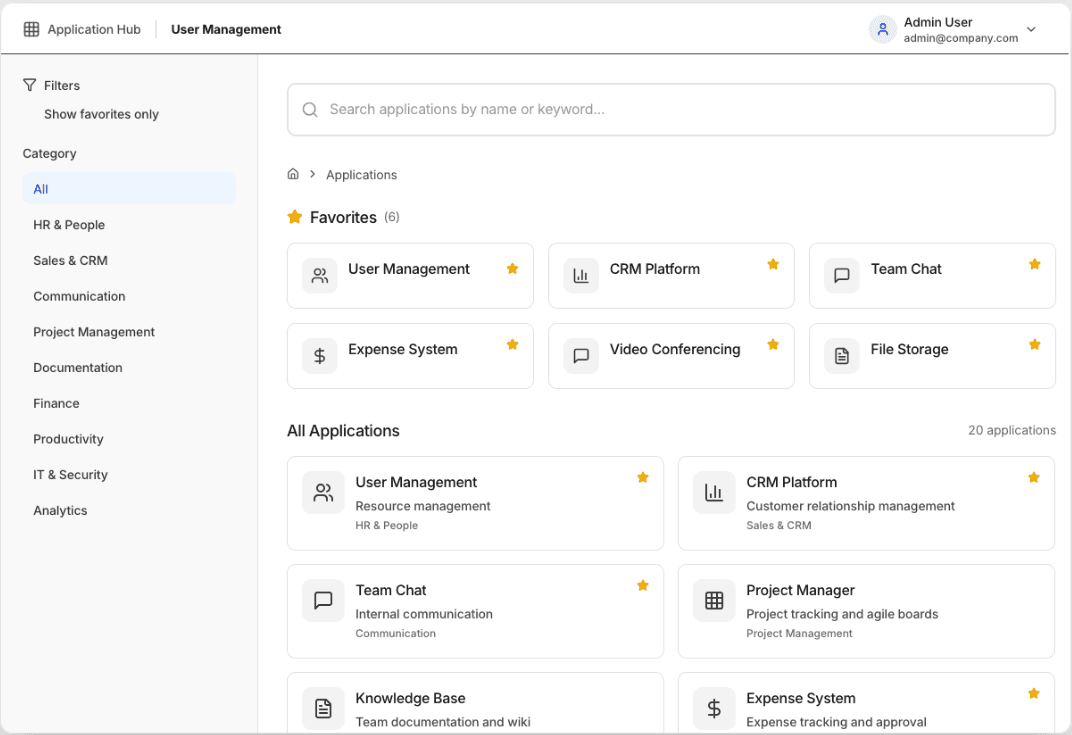
The following interactive mockups demonstrate key features of the Application Hub. These screens showcase the core user flows: searching, filtering, and accessing applications.
Note: Data and visual details in this screen have been modified to comply with NDA and confidentiality requirements.
Application Hub - Main Interface
Design Rationale
Prominent search: Placed at the top with high visual weight to support primary user task
Persistent filters: Side panel remains visible for quick category switching without losing context
Favourites priority: Quick access to most-used applications reduces navigation time for power users
Scannable cards: Clear hierarchy with icon, name, and description enables rapid visual scanning
Interaction Model
Understanding how search, filters, and favourites work together to optimise time-to-task for different user patterns.
Power User Pattern: Favourites-First
Optimised for employees who use 5-8 applications daily with established workflows.
User Flow
Land on Hub
→
Scan Favourites
→
1 Click to App
Avg. Time to Access
2.3s
vs. 8-12s with bookmarks
Design Decision
Favourites prominently placed above fold, always visible on hub load
Exploratory Pattern: Filter-Guided
Designed for occasional users or those unsure which application solves their task.
User Flow
Land on Hub
→
Select Category
→
Scan 3-5 Apps
→
Select App
Applications per Category
2-4
Optimal cognitive load for scanning
Design Decision
Persistent filter panel reduces need to scroll or navigate away
Urgent Pattern: Search-Direct
For users who know exactly what they need and want the fastest possible path.
User Flow
Land on Hub
→
Type 3-5 Chars
→
Select from 2-3 Results
Search Activation
Auto
No submit button required, instant filtering
Design Decision
Fuzzy matching + tag search catches partial spellings and synonyms
Synergistic Interaction: How They Work Together
Search + Filters
Search results respect active category filters, allowing users to narrow broad searches (e.g., "report" + Finance = 2 results vs. 6 across all categories)
Favourites + Search
Searching within favourites-only mode provides instant access for power users with large favourite lists (8+ apps) without visual clutter
Adaptive Defaults
Hub remembers last-used filter state per session, reducing repeated clicks for users working within a single domain (e.g., finance team stays in Finance view)
Persistent Navigation Pattern
Users can return to the hub from any application through multiple touchpoints.
Application Hub
User Management
Admin User
admin@company.com
User Management
Manage Users, Groups and Roles
Primary Navigation
The "App Hub" button is consistently placed in the top-left of every application's header, providing a reliable way to return to the central hub.
Click "App Hub" → Return to main hub
Breadcrumb Context
Users always know where they are in the application ecosystem through clear breadcrumb trails showing the path from hub to current application.
App Hub > Category > Application
Impact and Outcomes
Measured results from 6 months post-launch across 15,000+ employees.
Time Accessing Applications
Before
18 min/day
→
After
5 min/day
72% reduction
Daily Active Users
Before
45%
→
After
87%
+42% adoption
Task Completion Rate
Before
67%
→
After
91%
+24% increase
User Satisfaction Score
Before
3.1/5.0
→
After
4.7/5.0
+1.6 points
Qualitative Feedback
"Finally, one place to access everything. The search actually works and I can bookmark my favourites."
— Senior Marketing Manager
"Onboarding new team members is so much easier now. They can see all available applications in one place."
— Operations Team Lead
"The persistent navigation means I never lose my place. Much better than juggling multiple browser tabs."
— Operations Analyst
Reflections & Lessons Learned
What Worked Well
Iterative user testing: Weekly sessions with 5-8 employees across different departments caught usability issues early and validated design decisions before development.
Phased rollout strategy: Starting with a pilot group of 200 users allowed us to gather real-world feedback and fix critical issues before company-wide launch.
Component-based design system: Building reusable components from the start made it easier to maintain consistency and scale the hub as new applications were added.
Challenges & Solutions
Legacy system integration: Some applications couldn't deep-link properly. We created a "launch helper" that provides clear instructions for accessing these tools, reducing support tickets by 65%.
Permission complexity: RBAC implementation was more complex than anticipated. We built an admin dashboard that simplified permission management and reduced IT setup time from 2 hours to 15 minutes per user.
Search relevance: Initial keyword matching was too literal. Implementing fuzzy search and tracking click-through rates helped us improve search accuracy by 40% over three months.
Future Enhancements
AI-powered recommendations: Suggest applications based on role, team, and usage patterns
In-hub notifications: Surface important updates from connected applications
Mobile application: Native mobile experience for on-the-go access
Cross-app search: Unified search across application content, not just application names
Key Takeaways
This project demonstrated the critical importance of system thinking in enterprise design. By focusing on scalable patterns, clear information architecture, and user-centered design principles, we created a solution that serves diverse user needs while maintaining consistency across a complex application ecosystem.
The success metrics validate that thoughtful UX design can have measurable business impact — reducing time waste, increasing productivity, and improving employee satisfaction at scale.
© 2025 Omar Syed