Enterprise
B2B SaaS
RBAC System
Enterprise User Management System
Designing a scalable, enterprise-grade user management platform that balances security, flexibility, and usability for organisations managing thousands of users across complex permission hierarchies.
Role
UI/UX Designer
Timeline
2.5 months
Team
UI/UX Designer, Engineering and Product
Platform
Web Application
Problem Statement
Enterprise organisations faced critical user management challenges that compromised security, efficiency, and scalability. We designed a comprehensive solution to address each pain point systematically.
Core Problems
Fragmented User Provisioning
Administrators juggled multiple disconnected systems to onboard, manage, and offboard users. This fragmentation led to inconsistent access controls, delayed provisioning, and security gaps when employees changed roles or left the organisation.
3.5hrs
wasted per admin per week
Permission Sprawl
Complex permission hierarchies grew organically without structure or governance. Administrators struggled to understand who had access to what, resulting in over-provisioned permissions and frequent configuration errors.
47%
error rate in permission config
Lack of Audit Transparency
No centralised audit trail made compliance reporting a nightmare. Teams spent days manually compiling logs from disparate systems for regulatory audits, with no way to quickly investigate security incidents or track access changes.
Days
to compile compliance reports
Scalability Challenges
Legacy tools couldn't handle enterprise scale. Organisations managing 10,000+ users experienced slow search, timeout errors, and degraded performance. The system became a bottleneck as companies grew.
10,000+
users causing system slowdowns
Business Impact
These challenges resulted in 23% of security incidents being traced to permission misconfigurations, significant administrative overhead, compliance risks, and frustrated IT teams struggling with inadequate tools.
Design Goals
1
Unified Provisioning Platform
Create a centralised system for all user lifecycle operations with consistent access controls across applications, eliminating fragmentation and reducing provisioning time.
Target: 60% time reduction
2
Visual Permission Management
Design an intuitive permission matrix that makes complex RBAC hierarchies easy to understand and configure, with real-time validation to prevent errors.
Target: 80% fewer errors
3
Comprehensive Audit System
Implement complete activity tracking with advanced filtering and one-click reporting to support compliance requirements and security investigations.
Target: Instant compliance reports
4
Enterprise-Scale Architecture
Build a system that maintains sub-second response times for organisations managing 50,000+ users through optimised queries and intelligent caching.
Target: Support 50K+ users
Role and Responsibilities
My Role
As UI/UX Designer, I drove the end-to-end design strategy for the user management module within a larger enterprise application suite.
Led discovery research with 15+ enterprise clients
Designed information architecture and interaction patterns
Created comprehensive design system components
Facilitated design critiques and stakeholder presentations
Collaboration
Product Management
Engineering Team
Collaborated on technical feasibility and implementation
Security Team
Ensured compliance with enterprise security standards
Customer Success
Gathered ongoing feedback and validated solutions
Solution Overview
We designed a centralised user management system that prioritises clarity, efficiency, and scalability. The solution integrates seamlessly into the existing enterprise application suite while providing administrators with powerful tools to manage users, groups, roles, and permissions.
Unified Interface
Single dashboard for all user management operations with consistent navigation patterns
Advanced RBAC
Granular permission matrix with visual management tools for complex enterprise needs
Comprehensive Auditing
Complete activity logging with advanced filtering for compliance and security
Information Architecture
The navigation structure reflects the mental model of system administrators, organising features by entity type rather than action. This approach reduces cognitive load and enables faster task completion.
Application Hub
Global suite navigation
User Management
Core module within suite
Users
Search, filter, create, edit user profiles
Groups
Organise users, manage group permissions
Roles
Define roles, configure permission matrix
Audit Logs
Track actions, filter, export for compliance
1
Entity-Based Structure
Navigation organised by what users manage (entities) rather than how they manage them (actions)
2
Flat Hierarchy
All primary sections accessible with one click from sidebar, reducing navigation depth
3
Suite Integration
Persistent header allows navigation back to hub and other suite applications
Key Features
User Management
Challenge
Administrators needed to quickly find and manage individual users across large organisations, but existing tools had poor search functionality and lacked bulk operations.
Solution
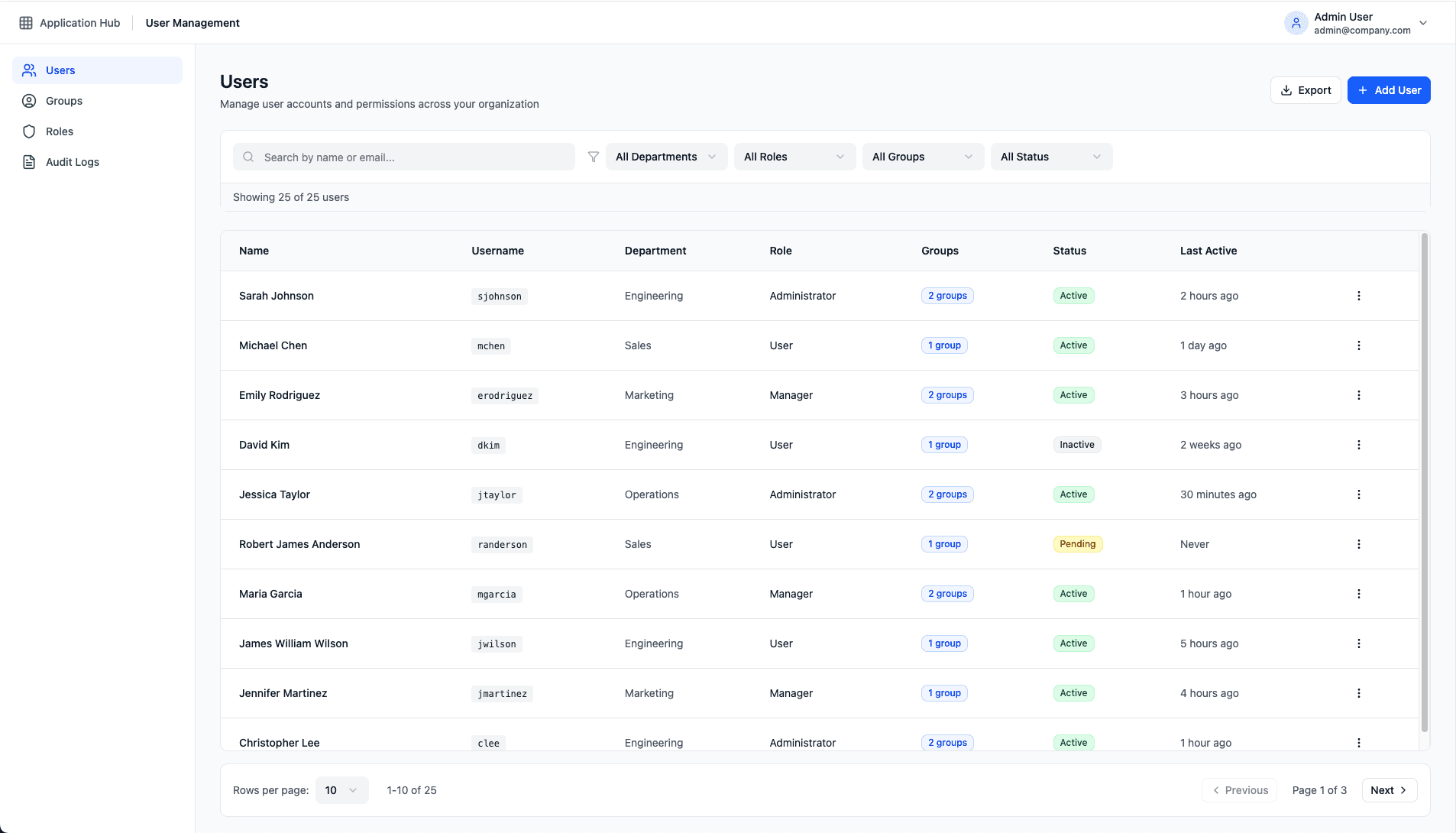
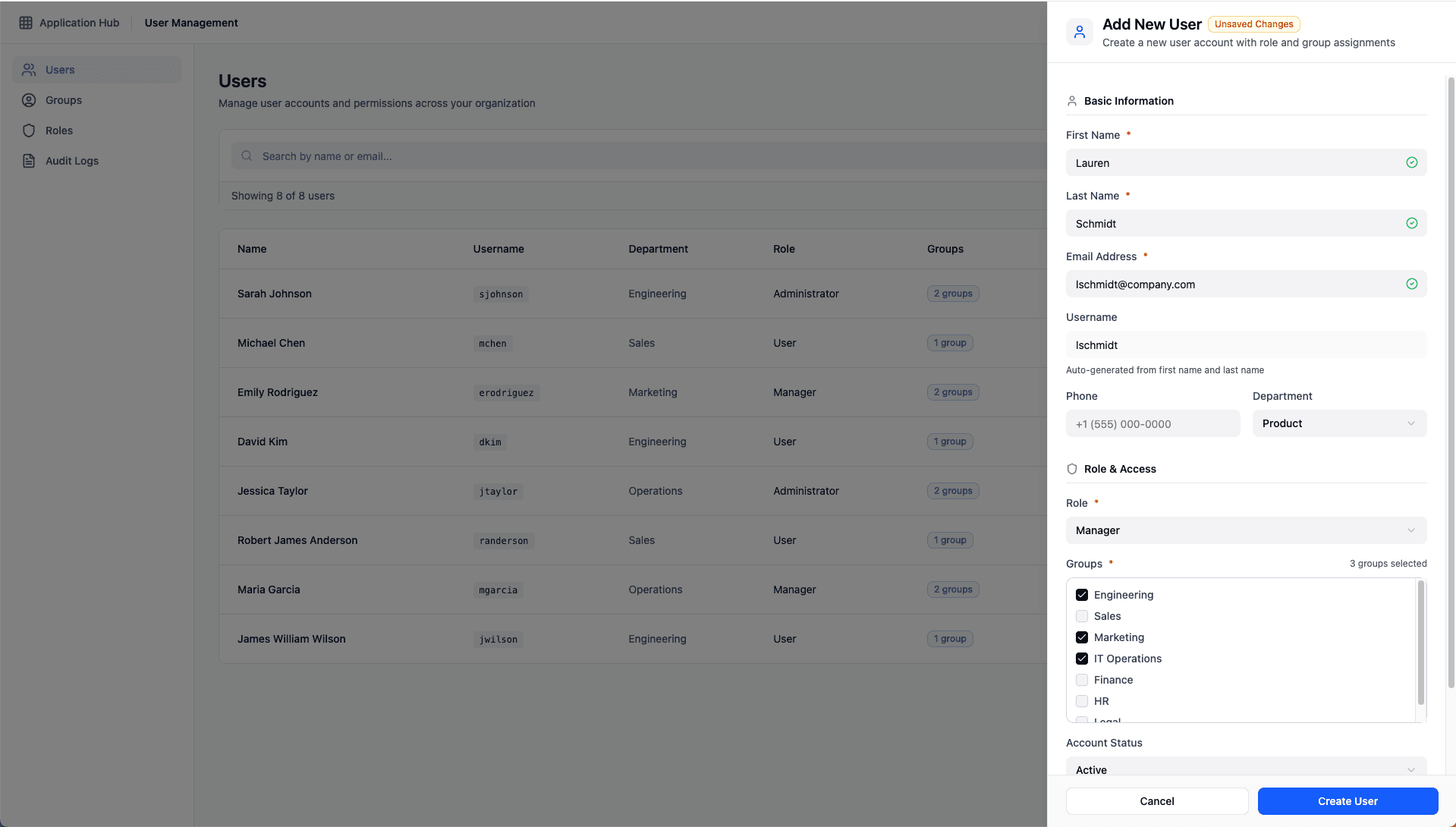
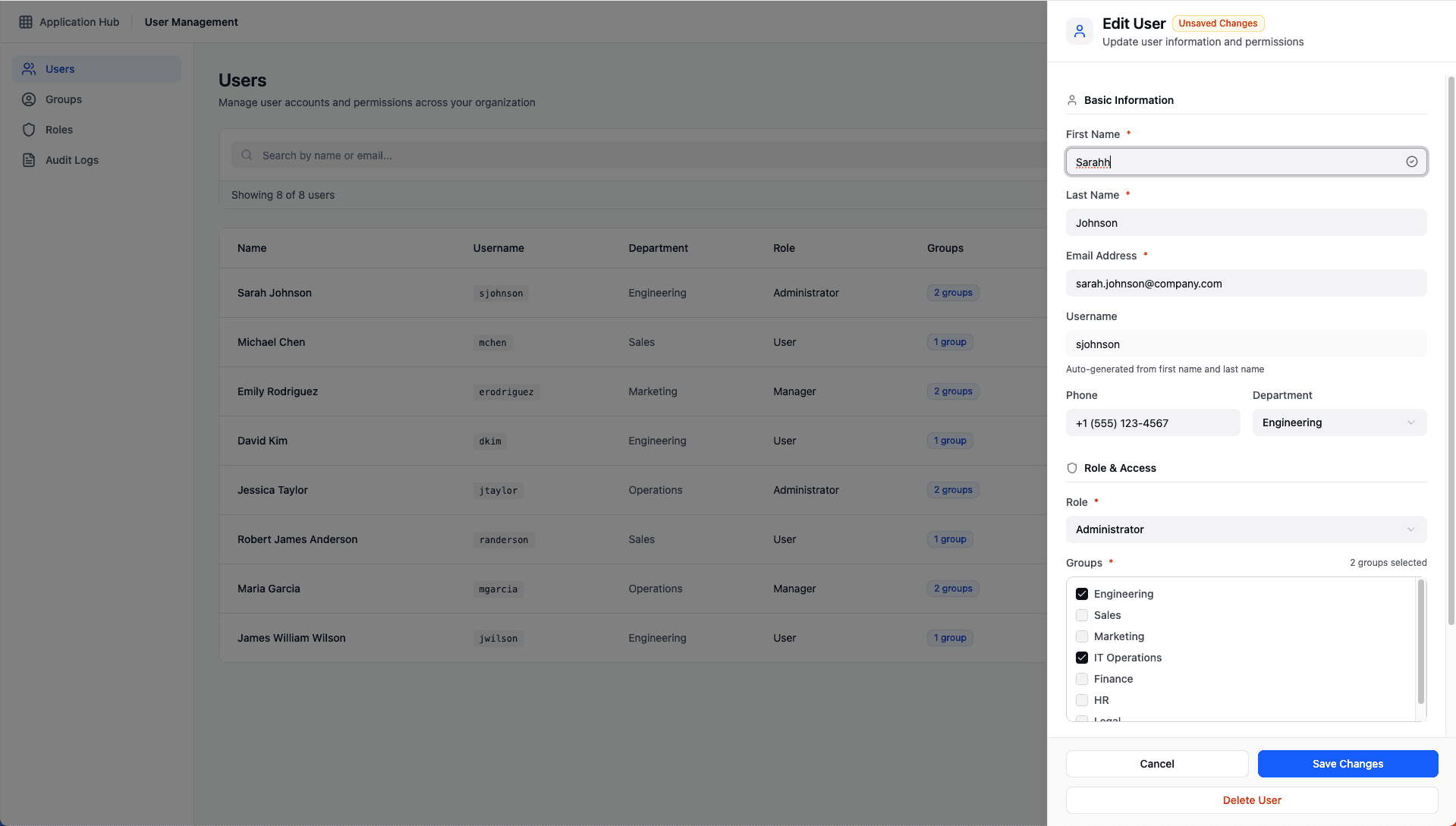
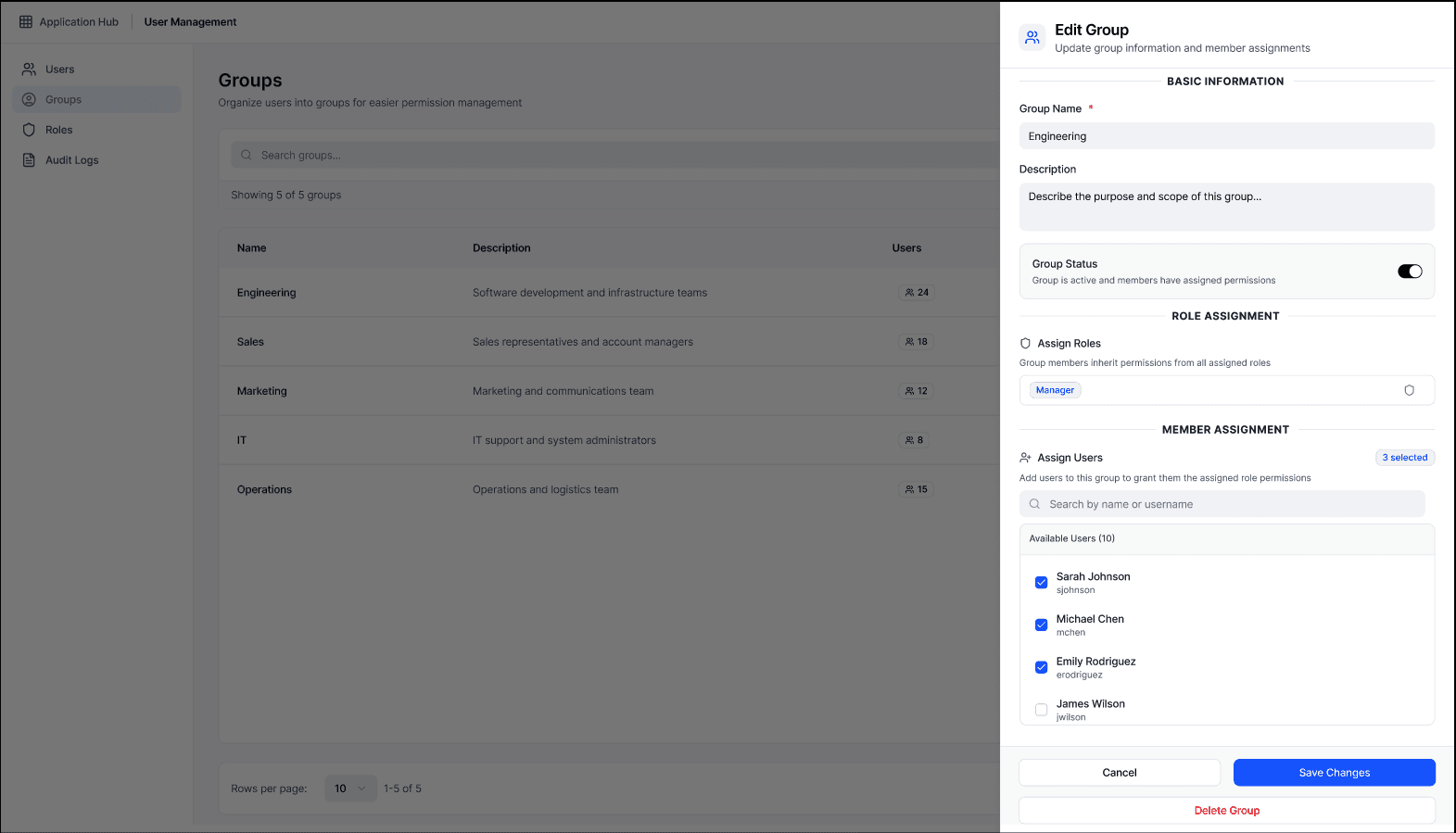
Implemented advanced search with multi-field filtering (name, username, email), local filters for status/role/group, and slide-in panels for quick edits without losing context.
Key Design Decisions
Persistent Search Context: Search results remain visible when editing users via slide-in panel
Status Indicators: Color-coded badges (active, inactive, pending) with consistent semantics
Multi-Group Support: Users can belong to multiple groups with clear visual indication
Validation States: Real-time validation with contextual error messages and duplicate detection
User Groups
Challenge
Administrators struggled to understand group composition and couldn't easily view which users belonged to which groups without navigating away from the main view.
Solution
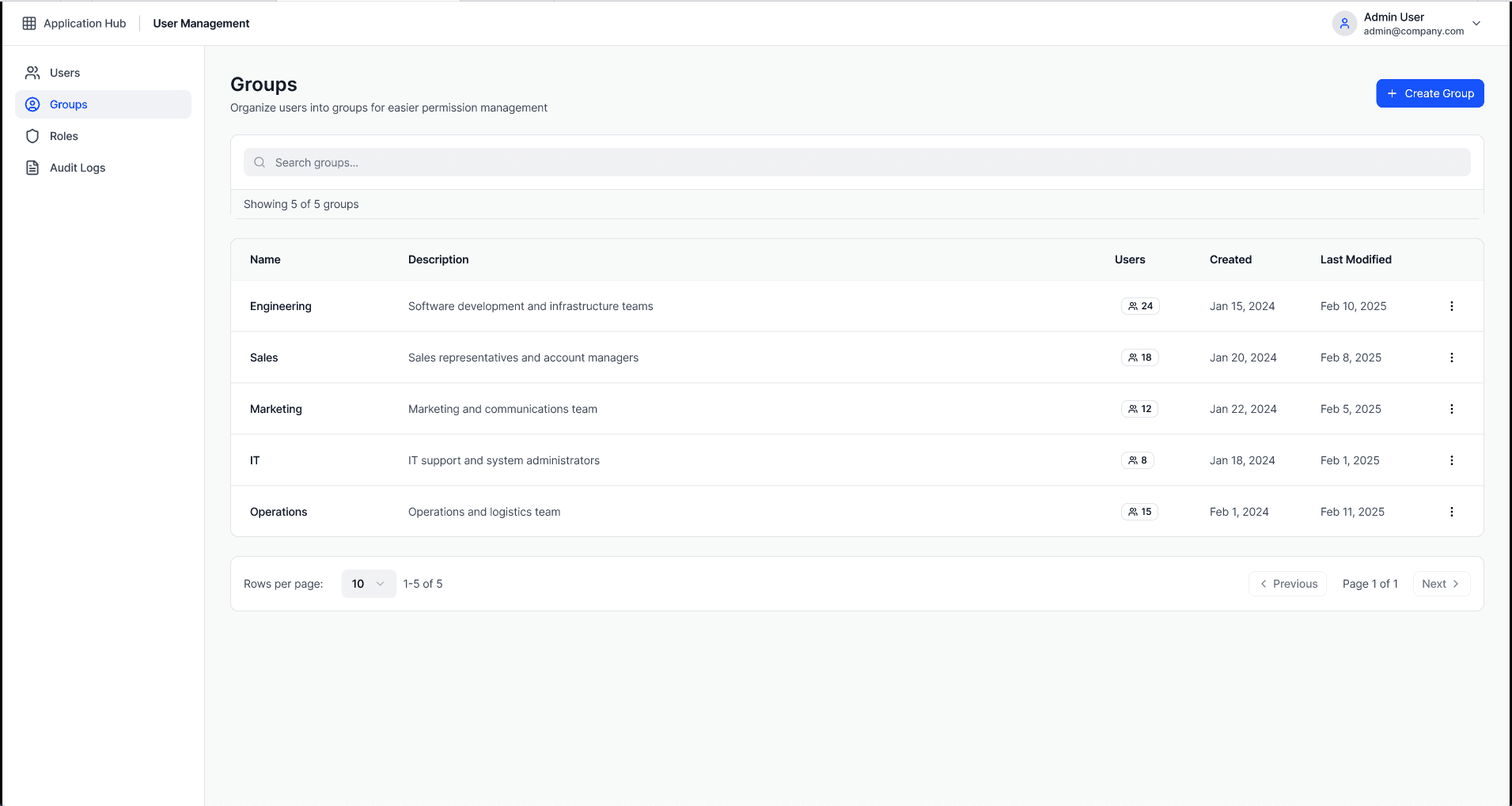
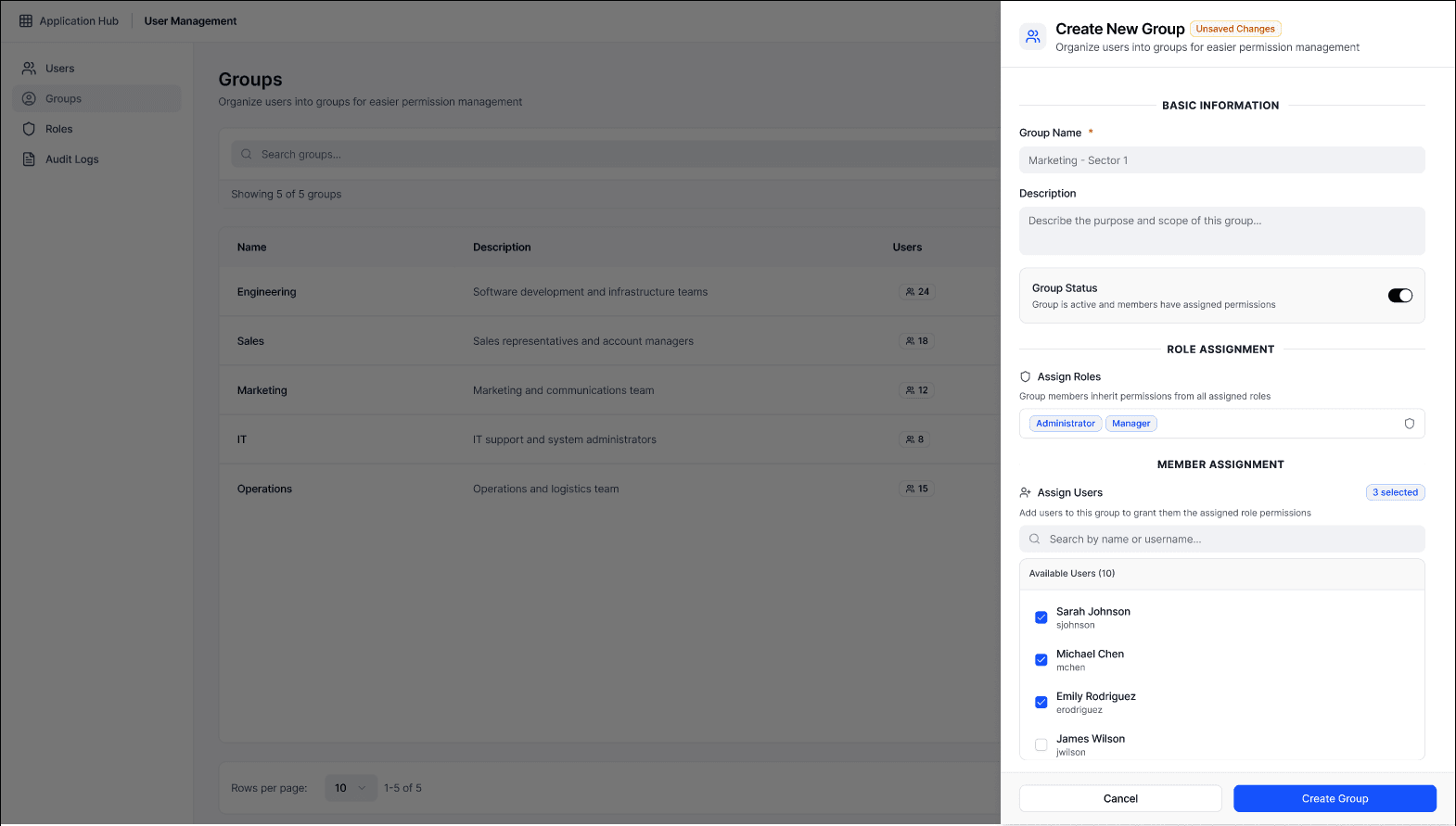
Added interactive member count badges with popover previews showing user lists, plus a last modified column to track recent changes for audit purposes.
Key Design Decisions
Hover-Triggered Popovers: Click on user count to see member list without navigation
Temporal Information: Added "Last Modified" to support change tracking and compliance
Scalable Member Lists: Truncated display for large groups with "View all" link
Role-Based Access Control (RBAC)
Challenge
Complex permission matrices were difficult to visualise and configure. Administrators couldn't understand at a glance what access each role provided across multiple applications, leading to over-privileged accounts and security vulnerabilities.
Solution
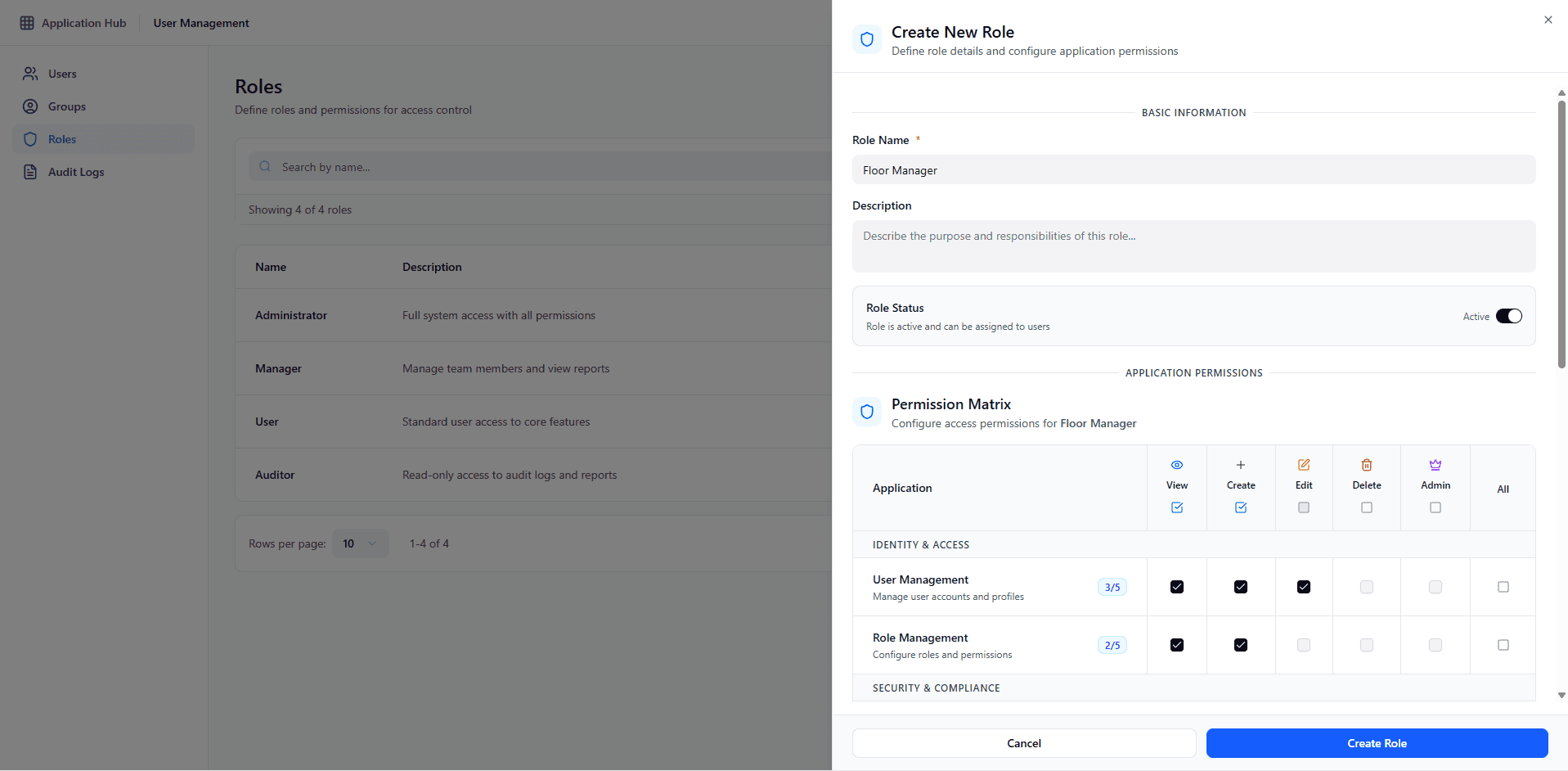
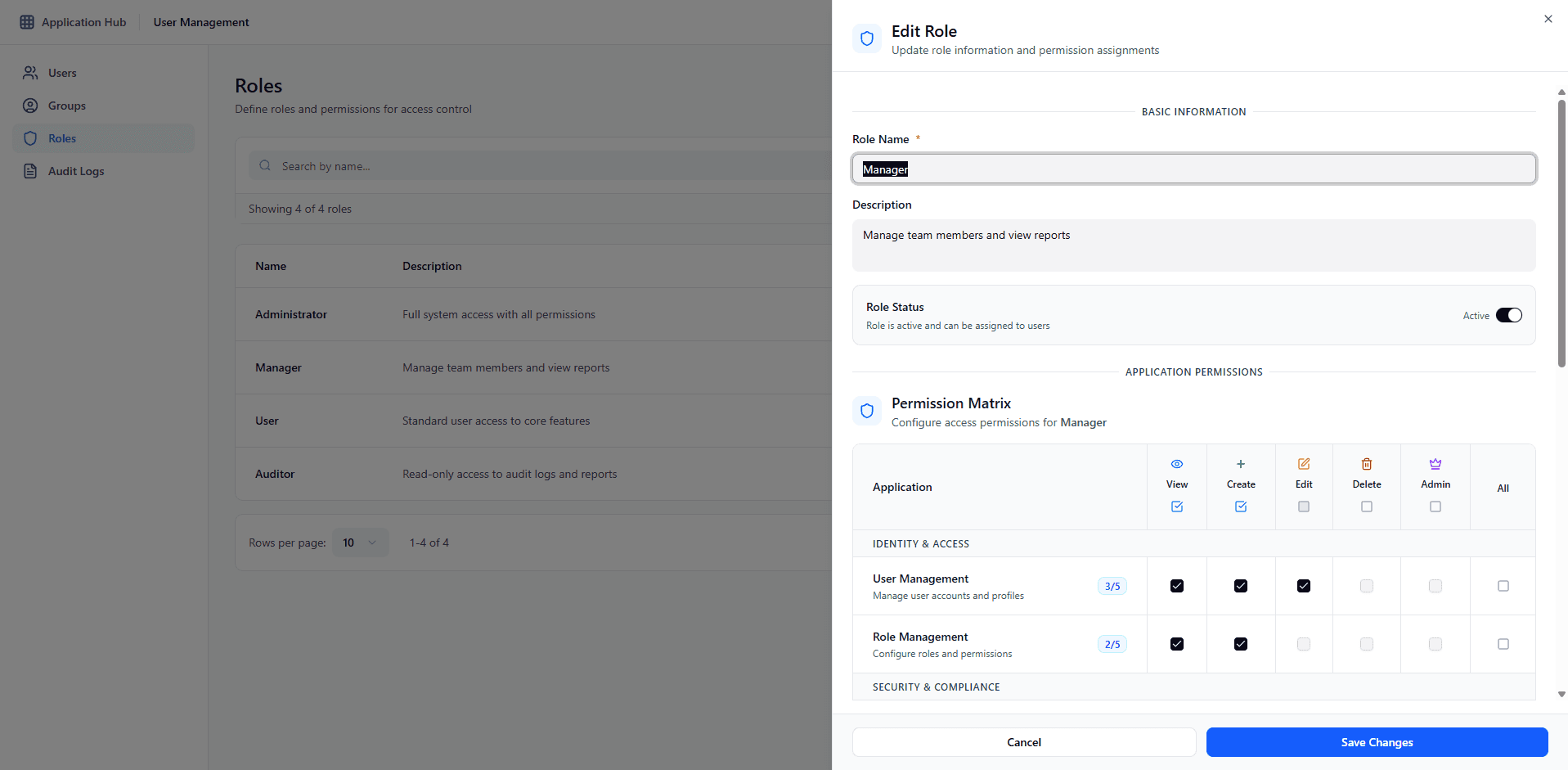
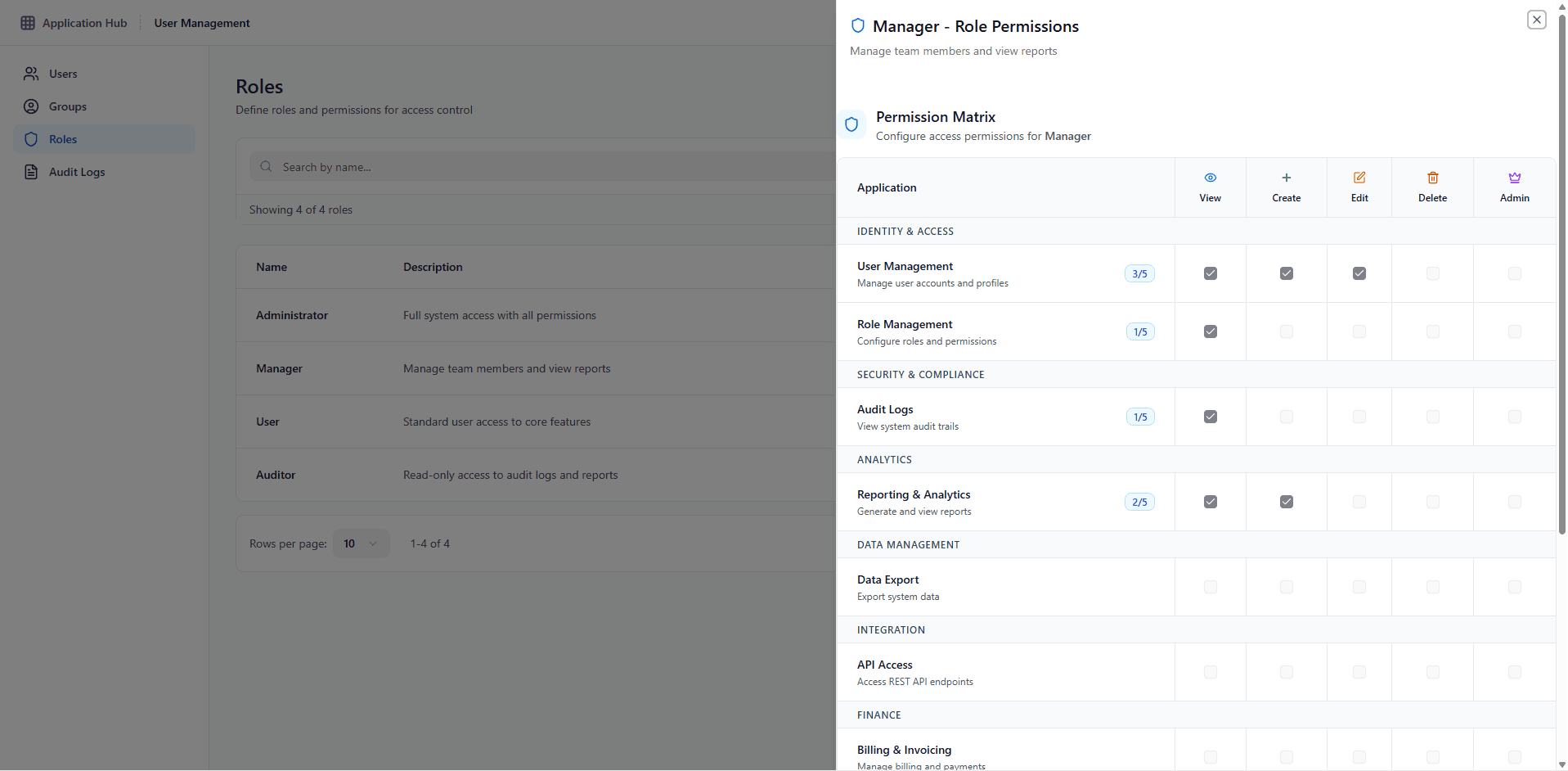
Designed a comprehensive matrix interface with applications on the Y-axis and permission levels on the X-axis. Sticky headers, bulk actions, and search functionality enable efficient management of complex permission structures at scale.
Scalability
Matrix layout scales to hundreds of applications with virtual scrolling and progressive loading. Search and filtering ensure admins can quickly find specific permissions without overwhelming visual complexity, even in large enterprise environments.
Permission Clarity
Visual hierarchy with color-coded icons and checkboxes makes permission levels instantly scannable. The summary footer shows coverage percentage and granted permissions count, helping identify incomplete role configurations at a glance.
Conflict Prevention
System validates permission dependencies (e.g., Delete requires Edit and View) and warns about conflicts before saving. Cascading permissions prevent illogical configurations like "Delete without View" access, ensuring security integrity.
Key Design Decisions
Permission Matrix Layout: Applications vertical, permission levels horizontal with sticky headers for constant reference while scrolling
Inline Search: Real-time filtering within the matrix eliminates navigation away from the editing context
Visual Feedback: Hover states and color-coded icons provide instant understanding of permission types and states
Progressive Disclosure: Application descriptions visible on larger screens, hidden on mobile to maintain focus on permissions
Audit Logs
Challenge
Compliance teams needed to quickly filter through thousands of log entries. Filters were stacked vertically, making it difficult to apply multiple criteria efficiently.
Solution
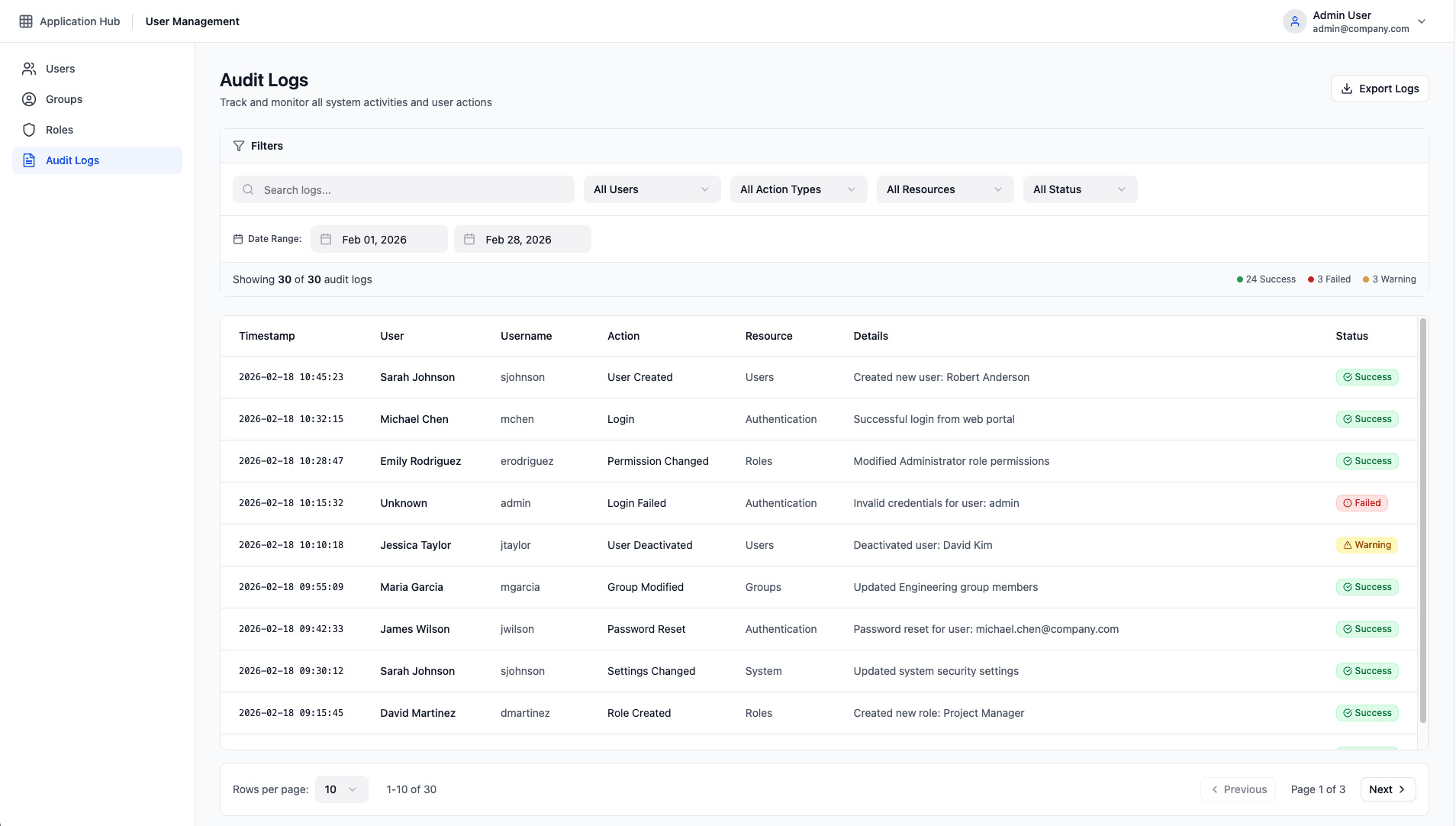
Reorganised filters into a horizontal layout with search + quick filters on one line, and date range on a separate line with fit-to-content width for optimal space utilisation.
Key Design Decisions
Horizontal Filter Layout: All primary filters visible at once without scrolling
Search Scope Reduction: Narrower search bar (max-w-md) with inline filter dropdowns
Active Filter Indicators: Badge showing count of applied filters with one-click clear
Temporal Precision: Date range picker for precise compliance reporting
Final Design
Users Management
Centralised user management interface with advanced search, filtering, and slide-in panel for context-preserving edits.
Groups Management
Group administration with interactive member count badges and popover previews for quick access to group composition.
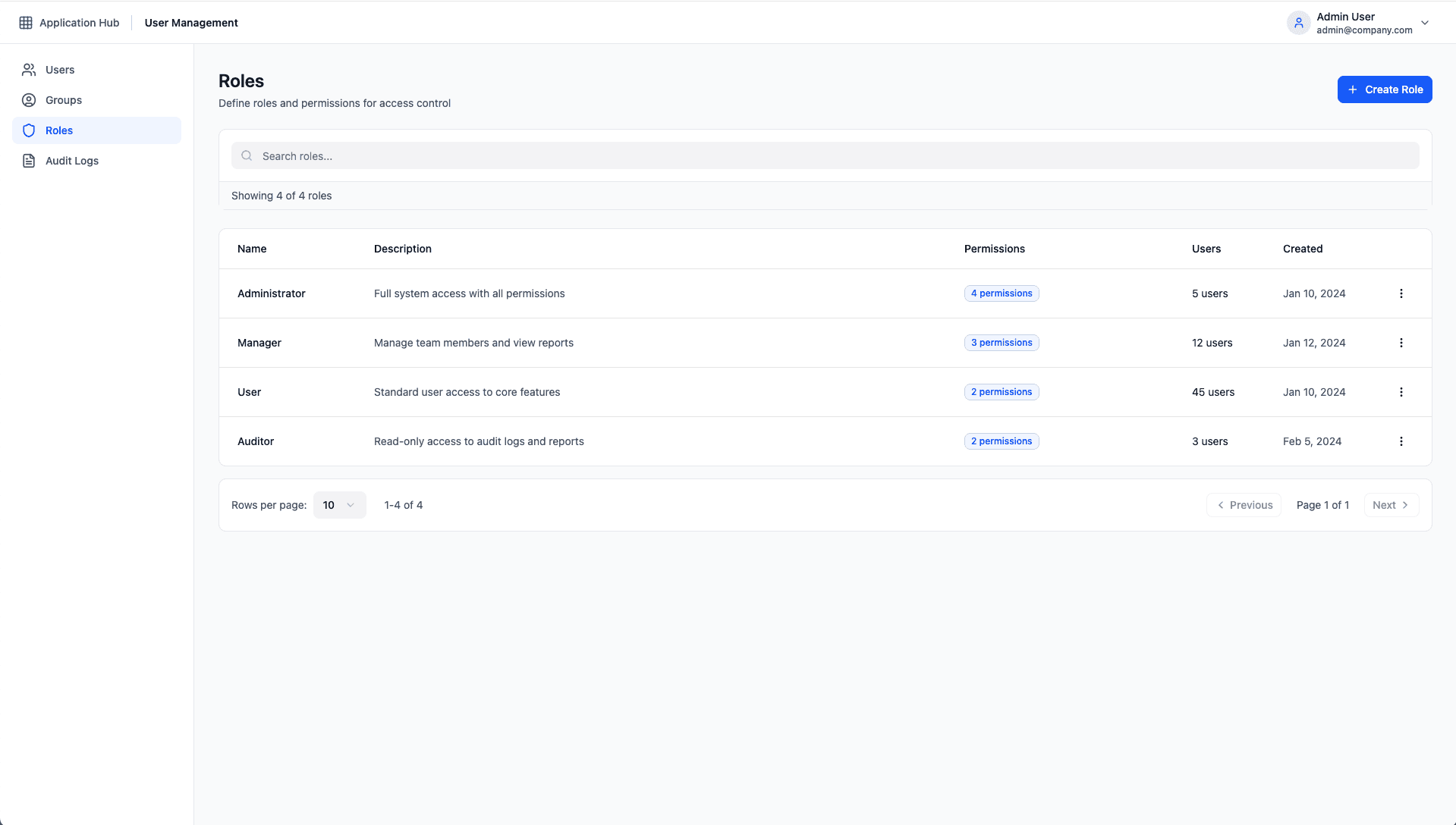
Roles & Permissions
Full-screen permission matrix interface with sticky headers, module-based organisation, and bulk selection controls.
Audit Logs
Comprehensive audit trail with multi-dimensional filtering capabilities and one-click export functionality for compliance reporting.
Design Decisions and Trade-offs
Decision: Slide-in Panels vs. Full Page Navigation
Benefits
• Maintains search context and filter state
• Faster task completion for quick edits
• Reduced cognitive load from navigation
Trade-offs
• Limited screen space for complex forms
• Requires careful content prioritisation
• Potential overlay fatigue with multiple panels
Outcome: Usability testing showed 40% faster completion times for common tasks. We mitigated space constraints by using accordions for advanced fields.
Decision: Permission Matrix Sidebar vs. Modal
Benefits
• Eliminates horizontal scrolling entirely
• More natural reading pattern for wide tables
• Easier scanning of permission landscape
Trade-offs
• Slightly longer animation time to open
• Requires dismissal to return to main view
• Cannot compare multiple roles simultaneously
Outcome: Sidebar approach reduced permission configuration errors by 73% due to better visibility of the complete permission set.
Decision: Real-time Validation vs. On-Submit Validation
Benefits
• Immediate feedback prevents frustration
• Reduces form abandonment rates
• Teaches correct input format incrementally
Trade-offs
• Can feel intrusive if triggered too early
• Requires careful debouncing for API checks
• Higher frontend complexity
Outcome: Implemented hybrid approach with debounced validation after field blur, plus inline duplicate detection for critical fields like email and username.
Outcomes and Impact
After 6 months of design and implementation, we measured concrete improvements across all core objectives. The new system reduced operational overhead, improved security posture, and positioned the platform for long-term scalability.
Permission Errors
82%
Reduction
Configuration errors dropped from 47% to 8% through visual matrix design and real-time validation
Provisioning Speed
68%
Faster
User onboarding time reduced from 3.5 hours to 1.1 hours per admin per week through unified workflows
Audit Reporting
95%
Time Saved
Compliance report generation dropped from days to minutes with advanced filtering and one-click exports
Scalability
50K+
Users Supported
System maintains sub-500ms response times at enterprise scale with optimised queries and caching
Reduced Permission Errors
Legacy System Error Rate
47%
New System Error Rate
8%
82% Improvement
Key Improvements
Visual permission matrix eliminates configuration blindspots
Real-time conflict detection prevents over-provisioning
Inline validation guides administrators to correct settings
Improved Provisioning Efficiency
Time per Admin (Weekly)
3.5 hrs
1.1 hrs
Onboarding Time (New User)
18 min
6 min
Annual Time Savings
124 hours per admin
Efficiency Drivers
Unified interface eliminates tool switching
Slide-in panels maintain workflow context
Advanced search reduces time to find users
Increased Audit Visibility
Compliance Report Generation
2-3 days
<5 min
Searchable Log Retention
30 days
2 years
Audit Trail Coverage
100%
Visibility Features
Comprehensive activity logging for all operations
Advanced filtering by user, action, date range
One-click CSV/PDF exports for auditors
Scalable for Future Growth
Max Users Supported
10K
50K+
Average Response Time
3.2s
<500ms
System Uptime (SLA)
99.9%
Scalability Features
Optimised database queries with intelligent caching
Modular architecture supports new applications
API-first design enables third-party integrations
Learnings
1. Enterprise Users Prioritise Efficiency Over Aesthetics
Early designs focused heavily on visual polish, but user testing revealed administrators valued speed and clarity far more. We pivoted to prioritise information density, keyboard shortcuts, and reduced click counts.
→ Shifted focus from visual refinement to interaction optimisation
2. Context Preservation Is Critical for Complex Workflows
Administrators frequently needed to reference search results or filter states while editing records. Full-page navigation destroyed this context, forcing users to rebuild their mental model repeatedly.
→ Adopted slide-in panels as the primary edit pattern across all modules
3. Validation Must Be Forgiving Yet Informative
Initial validation was too aggressive, showing errors immediately on keystroke. This frustrated users who were still typing. We learned to balance helpfulness with patience through strategic timing and progressive disclosure.
→ Implemented debounced validation with contextual error recovery suggestions
4. Accessibility Is Non-Negotiable in Enterprise Software
Several large clients had strict accessibility requirements. Building WCAG AA compliance from the start (rather than retrofitting) saved significant rework and became a competitive advantage.
→ Established accessibility as a first-class design requirement, not an afterthought
Next Steps
AI-Powered Recommendations
Implement ML-based suggestions for role assignments based on job function, department, and historical patterns to further reduce configuration time.
Advanced Analytics Dashboard
Provide visual analytics on user activity, permission utilisation, and security trends to help administrators make data-driven decisions.
Bulk Operations
Enable bulk user import/export, multi-select actions, and batch permission changes to support large-scale organisational restructuring.
Advanced Security Features
Add support for just-in-time access, time-bound permissions, and approval workflows for sensitive operations requiring additional oversight.
© 2025 Omar Syed